A hypertrophy training log that adapts to you

Your biceps recover in 36 hours. Your quads take 72. Your tracker should know the difference.

MYPertrophy times every suggestion — what's fresh today, what your next set should be, what to train next — to the muscle you're actually training, using volume landmarks and a recovery model built from peer-reviewed hypertrophy research. And it doesn't stop at the literature: once it has a few weeks of your own training, it checks how you've actually responded and recalibrates your own growth zones from there — not one flat weekly number for everyone, and not just the published average trainee either.

2.0×–4.0×weekly dose ceiling, clamped per muscle
12muscle groups, each modeled individually
0.75×–1.25×your own zones widen or narrow to match how you respond
3peer-reviewed sources behind the recovery model
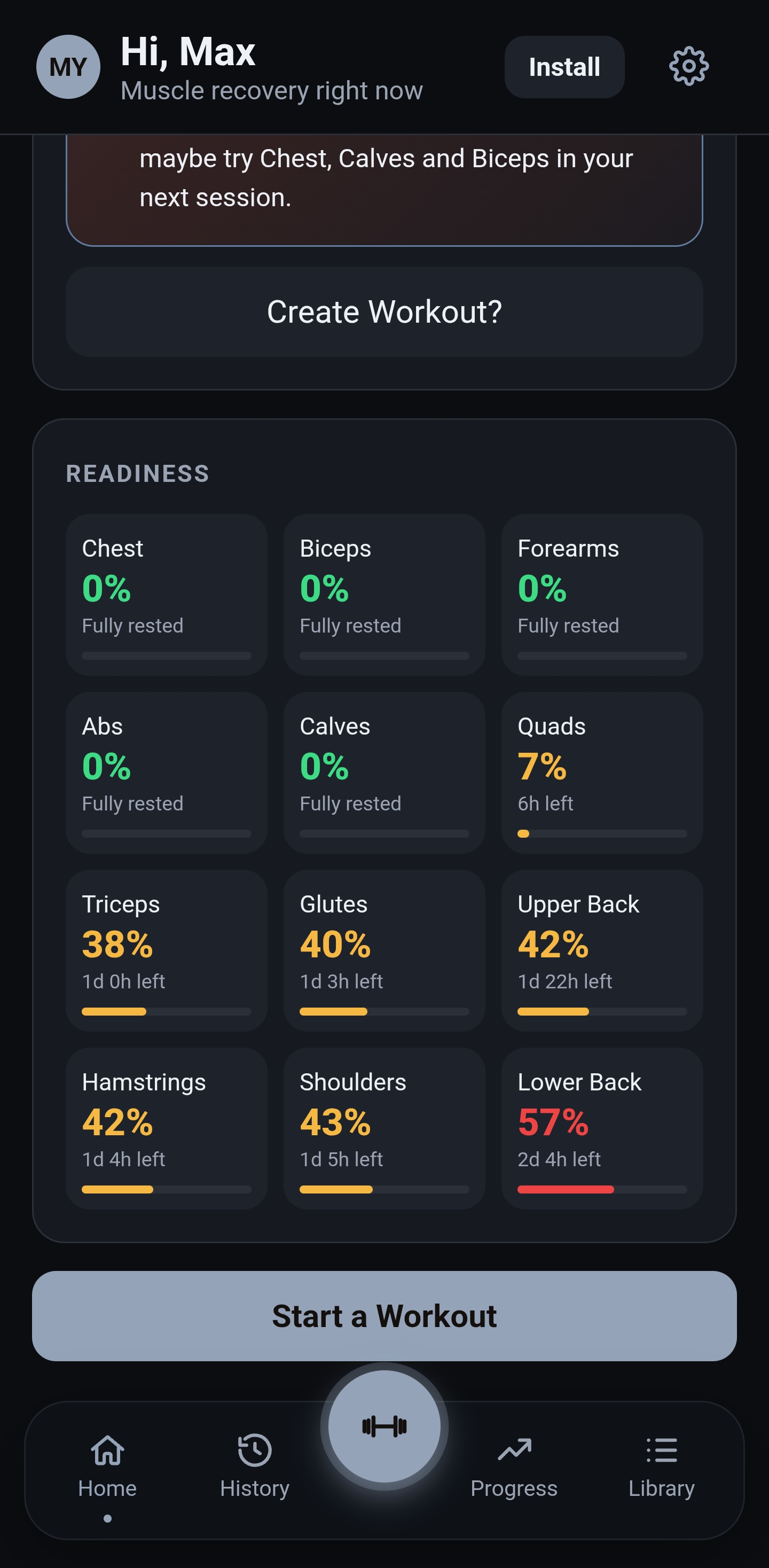
MYPertrophy dashboard — full readiness grid for all 12 muscle groups, five fully rested, Quads just starting to recover at 7%, Lower Back the most fatigued at 57%, live from a real account

What most trackers skip

A flat 48-hour rule doesn't hold for every muscle

Most workout apps either ignore recovery entirely or apply one blanket window to your whole body. But a muscle's own recovery timeline is largely a function of its size and role — the difference between forearms and quads isn't cosmetic, it's a real, published gap. MYPertrophy stores a literature-informed baseline per muscle and uses it everywhere: the live fatigue meter, the dashboard readiness grid, and how much volume counts as a "fair share" for a single session. See exactly how →

MuscleRecovery baselineImplied sessions/week
Biceps36h4.0× (capped)
Chest48h3.5×
Quads72h2.33×
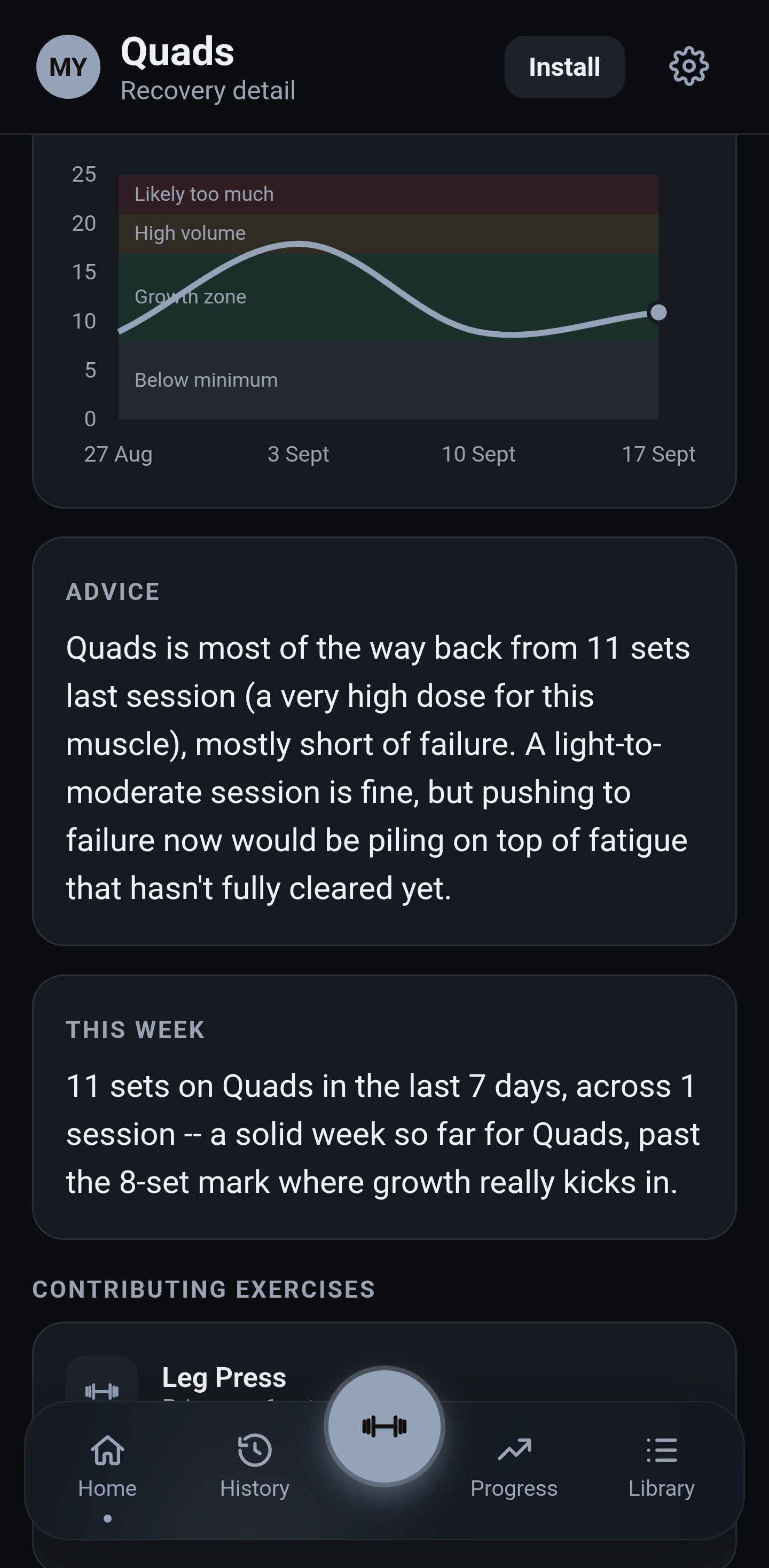
Quads recovery detail — a volume trend chart climbing into High Volume before settling back into the growth zone, with advice noting Quads is most of the way back from an 11-set session and 11 sets logged this week, past the 8-set mark where growth kicks in

Day to day

It doesn't just log sets — it reads them

The screens below are real — captured straight from a real account's own training, not a mockup built to look good on a landing page. Every quote is the exact text the app generated for that account.

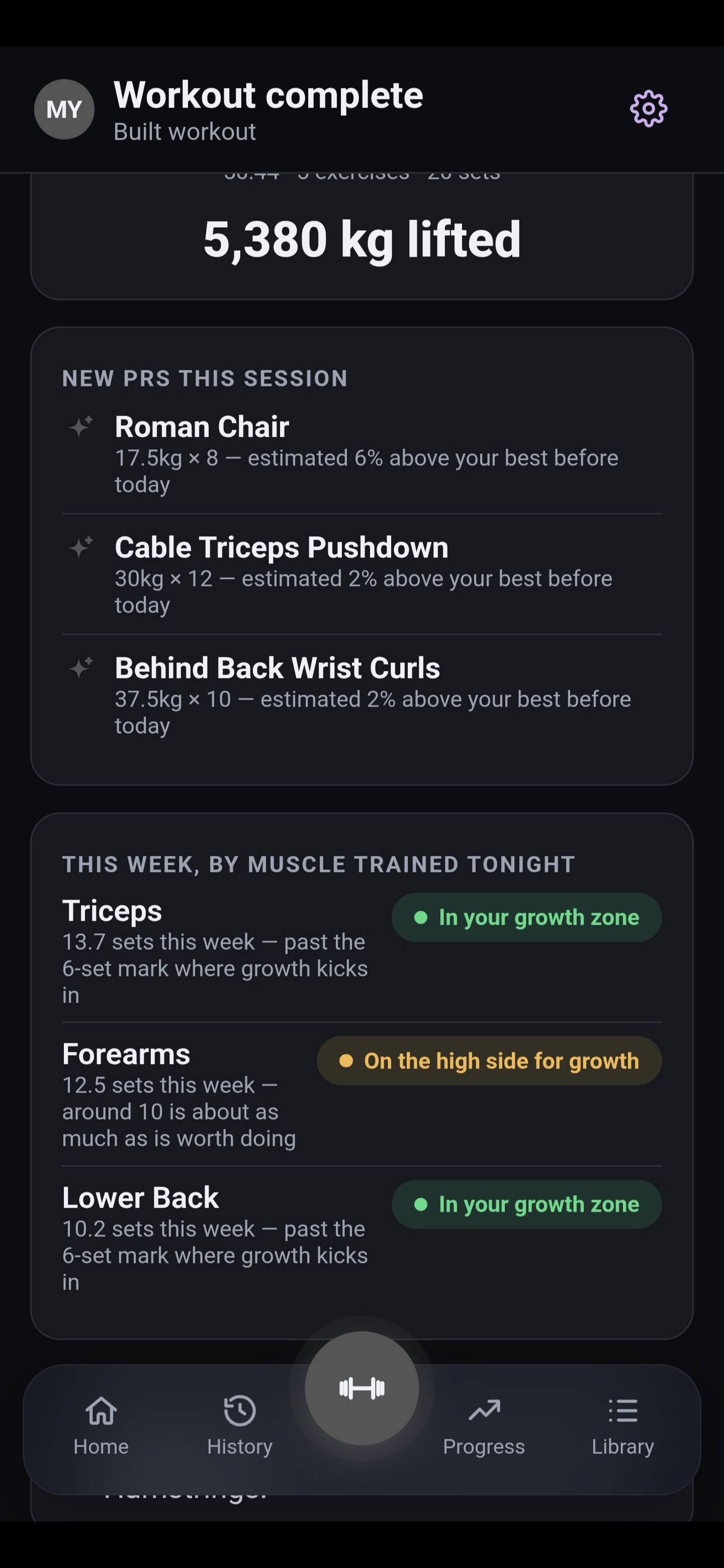
The one on the right is what that account saw the moment this session ended: total kg lifted, the exercises where tonight's numbers actually beat their own history, and where this week's volume landed for every muscle trained — worked out and shown before they'd even left the gym.

  • 1A PR isn't just a heavier top set — each one is checked against that account's own logged history for that exact exercise, so a rep PR at the same weight counts the same as a weight PR.
  • 2The growth-zone read for each muscle comes from the same per-muscle set thresholds behind the dose table and the readiness grid elsewhere on this page — never a flat weekly number everyone gets the same version of.
Workout complete screen — 5,380 kg lifted across 5 exercises and 20 sets, three new PRs this session including Roman Chair and Cable Triceps Pushdown, and this week's set counts by muscle trained tonight: Triceps and Lower Back in the growth zone, Forearms on the high side
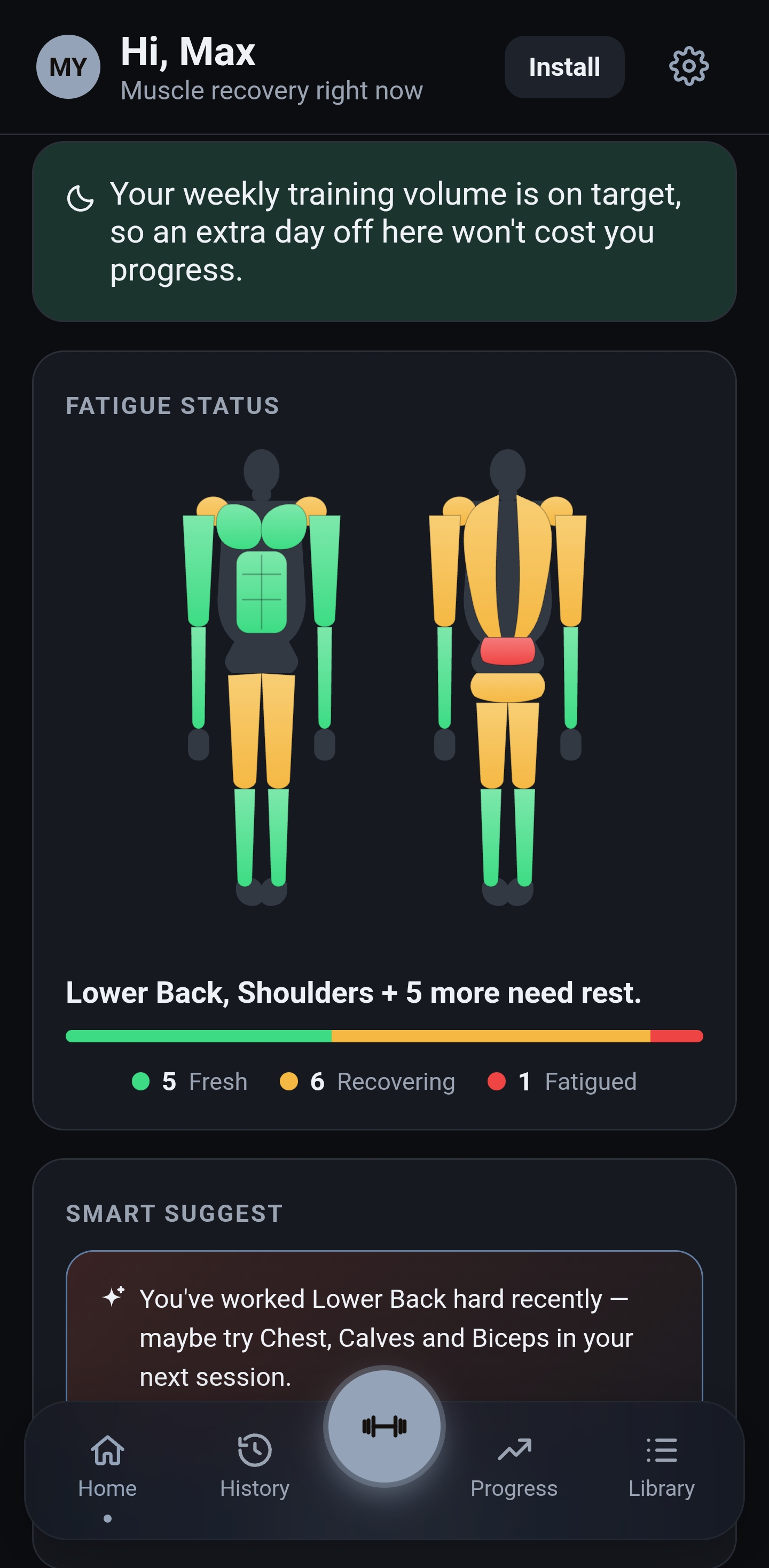
Fatigue status body diagram — Lower Back, Shoulders and five more still recovering, with a Smart Suggest card recommending Chest, Calves and Biceps next
Smart Suggest

Knows not to suggest what you just wrecked

The dashboard's next-session card is built entirely from the same recovery data driving the readiness grid next to it, so it can never contradict what you're already looking at.

Actual suggestion, real account "You've worked Lower Back hard recently — maybe try Chest, Calves and Biceps in your next session."
  • 1Only muscles currently reading fresh are candidates — nothing you just trained hard gets re-suggested, ranked by whichever's been idle longest.
  • 2Never pairs two high-demand muscle groups (quads, hamstrings, back, glutes) into one session, even if both happen to be fresh — that's a lot of combined systemic fatigue for one workout.
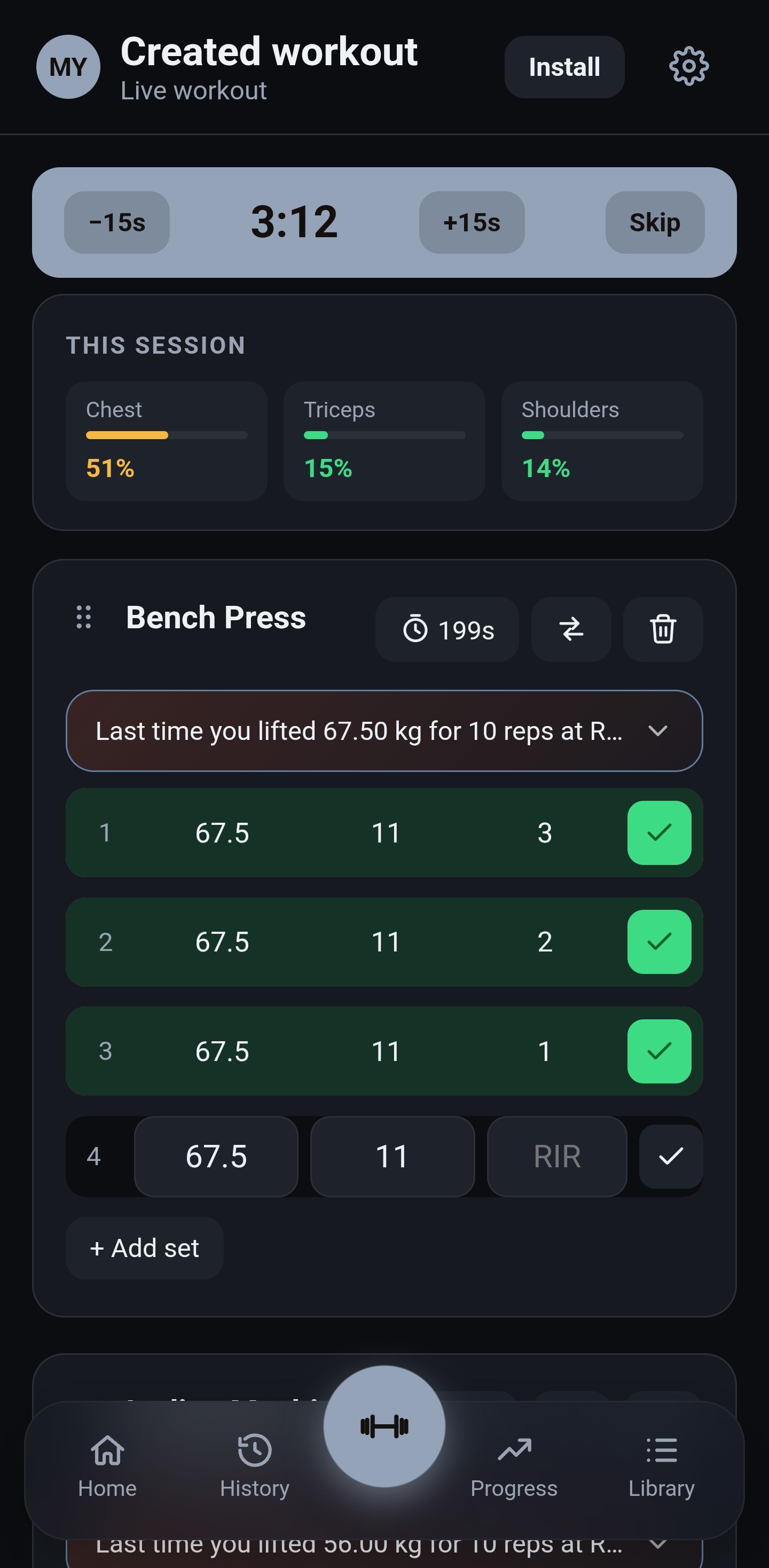
Live workout screen mid-session — Bench Press with a 3:12 rest timer counting down, sets logged at the suggested 67.5 kg × 11 reps target generated from last session's numbers
While you're still training

Told exactly what to lift, one set at a time — not just logged after the fact

Open an exercise mid-session and MYPertrophy has already worked the next set out for you, from your own last performance against that exercise's rep range: last time you lifted 67.5 kg for 10 reps at RIR 3.0, so it suggests the same weight for 11 reps — classic double progression — and holds sets at 4, since the muscle is already on pace for the week. No guessing at what to load, live, set by set.

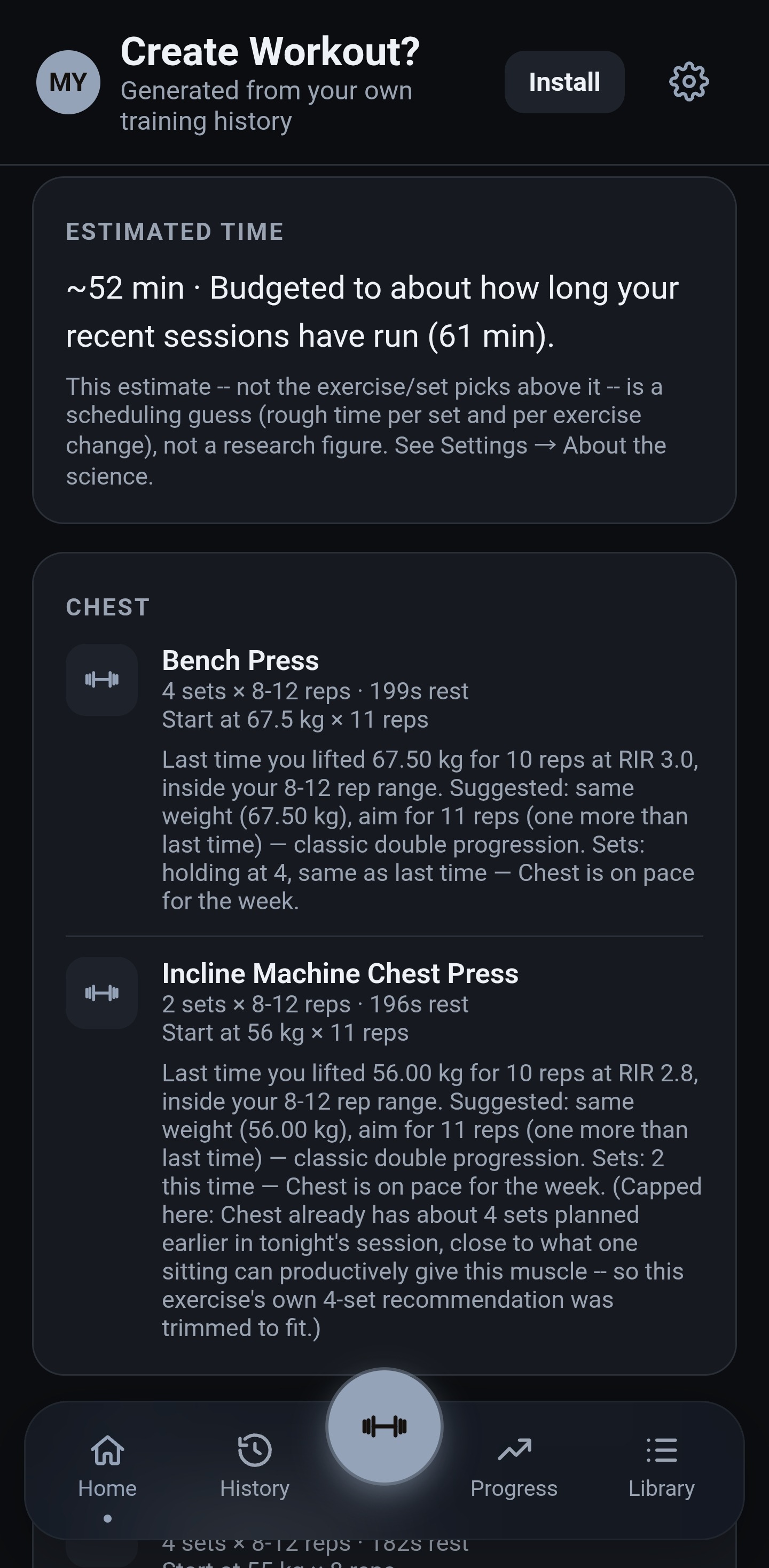
Create Workout screen generated from training history — Bench Press and Incline Machine Chest Press, each sized and reasoned, one trimmed to fit the session
Create Workout

A session built from what you've actually been doing — not a template

Tap it from Smart Suggest and MYPertrophy skips the generic template entirely. Ask it for Chest and it opens with Bench Press — 4 sets, 8-12 reps, start at 67.5 kg for 11 reps — sized to close this week's remaining volume gap, then Incline Machine Chest Press right behind it, its own 4-set recommendation trimmed to 2 since Chest already has a near-full session planned — each with the same reasoning attached.

  • 1Picks from your own exercise history for that muscle — ranked by frequency and recency, never a fixed list every account sees the same version of.
  • 2Sizes the sets to close this week's remaining gap to your minimum, or continues the next progressive step if you're already on pace — the same volume logic driving the rest of the app.
  • 3Fits the whole session to how long you usually train — and says so plainly when there isn't enough history for a muscle yet, rather than guessing.
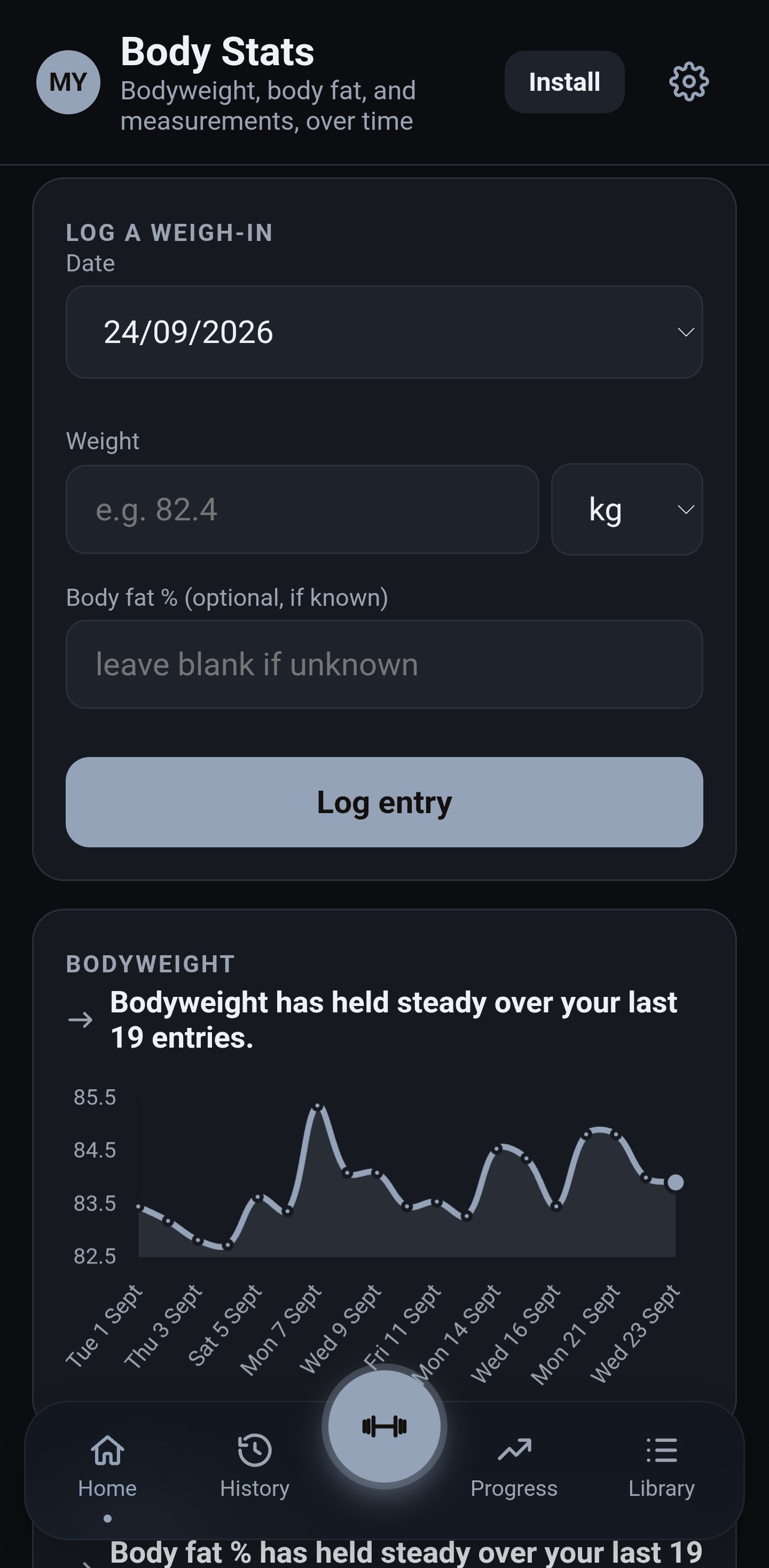
Body Stats screen — body fat percentage held steady over 19 readings, with a full history of bodyweight and body fat logged by date
Beyond the weight room

Bodyweight and body fat, tracked the same way as everything else

Log a weigh-in and MYPertrophy treats it like any other data point — charted over time, summarized in plain language, never left as a bare number. A real account's last 19 readings: body fat has held steady around 17%, most recently 83.9 kg at 17.1%, with the full date-by-date history underneath for whenever you want to check a specific week.

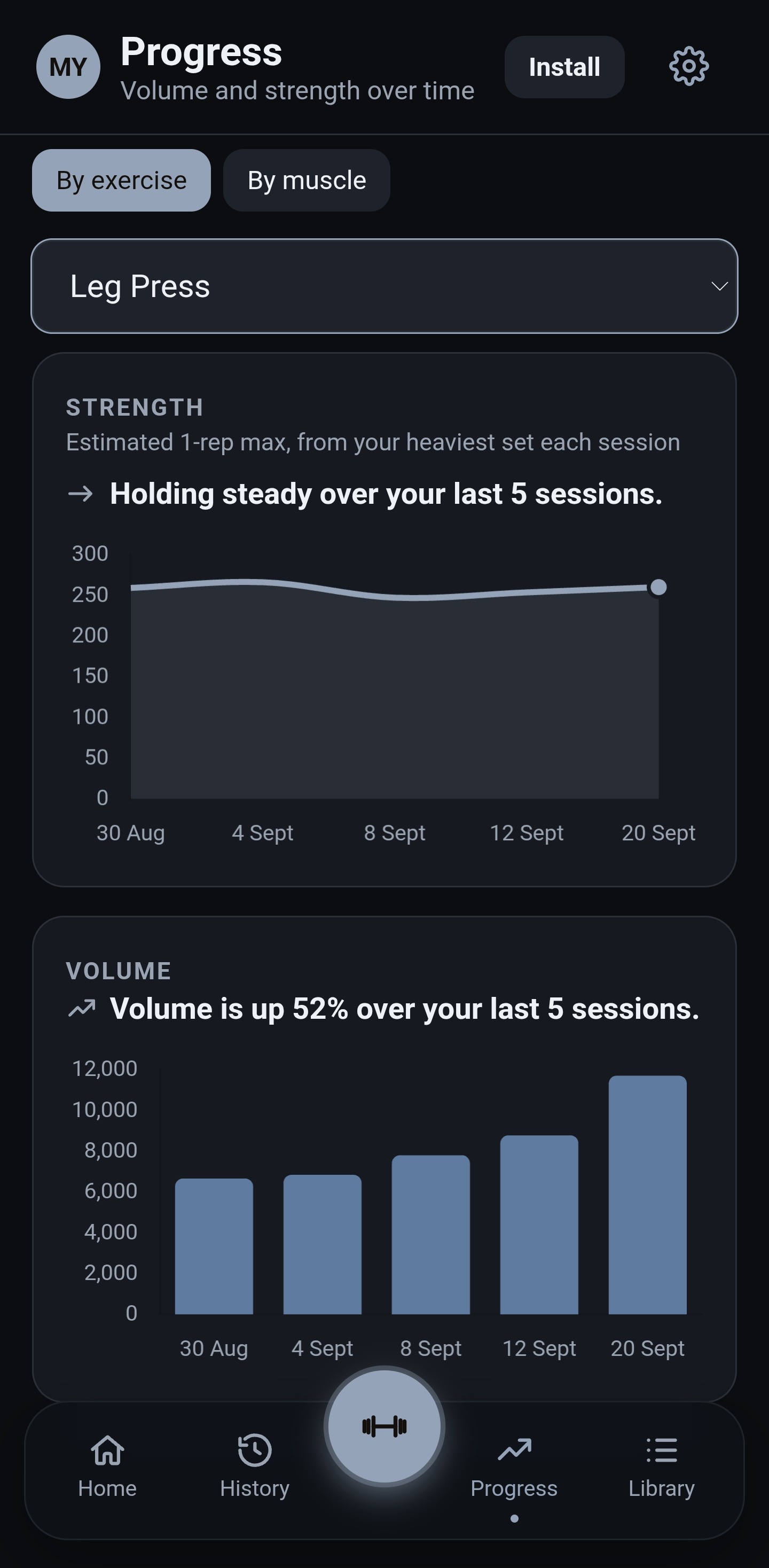
Progress screen for Leg Press — estimated 1-rep max holding steady over 5 sessions while training volume climbs 52% over the same stretch
More than one number

Strength and volume don't always move together — so it tracks them separately

Estimated 1-rep max, from the heaviest set each session, plotted against total volume for that same exercise. A real Leg Press example: strength has been holding steady over the last 5 sessions while volume has climbed 52% over the same stretch — the kind of pattern that's easy to miss looking at either chart alone, and easy to read the moment they're side by side.

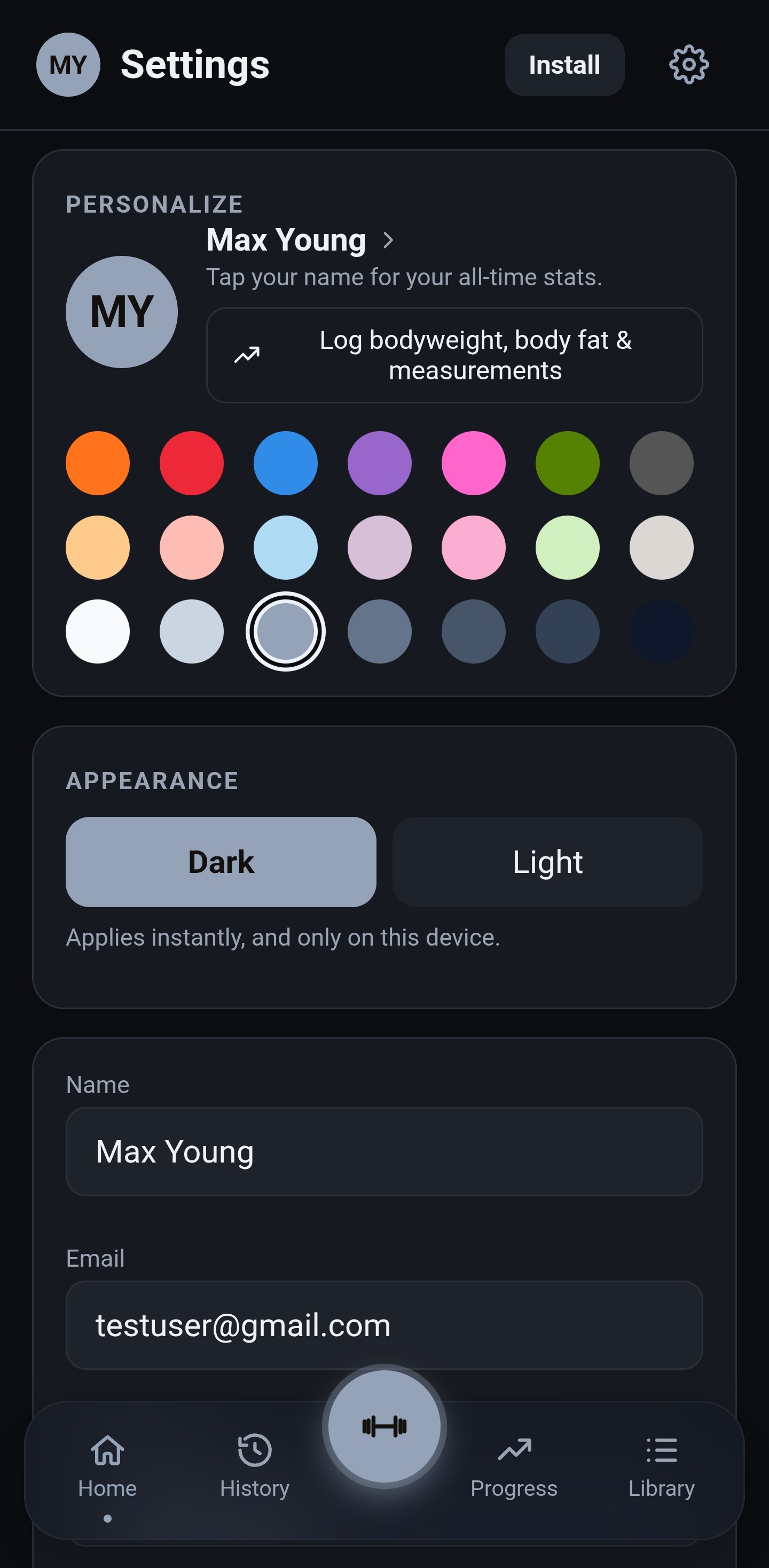
Settings personalize screen — a 21-color palette picker across three rows, with a muted grey-blue shade selected, and the account's initials shown in that color as the avatar next to the owner's name
Make it yours

Twenty-one colors to pick from, not a default nobody chose

Open Settings and pick an accent from a real palette — three rows of seven: bold, soft pastel, and a neutral set — and MYPertrophy carries it everywhere from there: your initials on the avatar, highlights on cards, charts and buttons throughout the app. Small on its own, but it's the difference between an account that feels assigned to you and one that feels like everyone else's.

Personalization & smart learning

Two of the most distinctive things it does happen quietly in the background

How it recalibrates your own growth zones, and what happens when a deload doesn't fix a plateau — plus the smaller signals it learns without ever asking you a question. They get their own page.

See how it learns →
The methodology

Built from three peer-reviewed sources, not a house guess

Every weekly volume ceiling, every single-session target, every recovery window traces back to a specific formula and a specific citation — not a number we made up because it sounded reasonable. The full derivation, the dose table, and the references have their own page, including the bits we've engineered ourselves and say so plainly.

Everything else it does

Built to actually get used

◐

Per-muscle body map

A front-and-back SVG body map color-codes every muscle group fresh, recovering, or fatigued at a glance — the same status language used everywhere else in the app.

↻

Undo-safe editing

Remove a set or a whole exercise you added by mistake and it's gone instantly with a 5-second undo — nothing hits the server, and nothing you logged is ever silently lost.

⇄

Install, offline, no accounts elsewhere

A real installable PWA — add it to your home screen and keep logging sets with no signal; everything queues in order and syncs the moment you're back online.

●

Your colors, your initials

Pick an accent from a real palette and MYPertrophy uses it for your avatar and highlights throughout — small, but it's your account, not a template.

☾

Honest rest-day calls

The dashboard won't call it a clean rest day just because you feel like resting — it checks whether you're still behind this week's minimum volume on any muscle first, and names exactly which ones if you are.

✎

Your own exercises, properly weighted

Add a custom exercise and tag its secondary-muscle involvement on the same Light/Medium/Heavy scale the reviewed library already uses — no second-class citizens.

↗

Progression suggestions that show their work

Tap the suggestion button on any exercise and it looks at your last real session — weight, reps, reps-in-reserve — and applies double progression: stay in range and it adds a rep first, hit the top with reps to spare and it adds load.

▤

160+ exercises with reviewed muscle mapping

Every default exercise carries a reviewed primary muscle and Light/Medium/Heavy secondary weighting, so an accessory lift contributes the right fraction of a set — plus your own variations, properly tagged too.

✐

Per-exercise cues & session notes

Leave yourself a private note on any exercise — grip, setup, cambered bar — plus one whole-session note for context later, right alongside the numbers.
Train with the recovery windows already worked out for you.

Free, ad-free, and built on published research — currently in private testing.